# Frends Runtime Environment

The Frends runtime environment is built on Environments, Agent Groups, Agents, and Triggers. Together they define where Processes are deployed, what runtime resources are used, and how Process execution starts.

A Process is not executed directly by the Tenant or by an Environment. A Process is deployed to an Agent Group, and one or more Agents in that Agent Group execute it when a Trigger starts a new run.

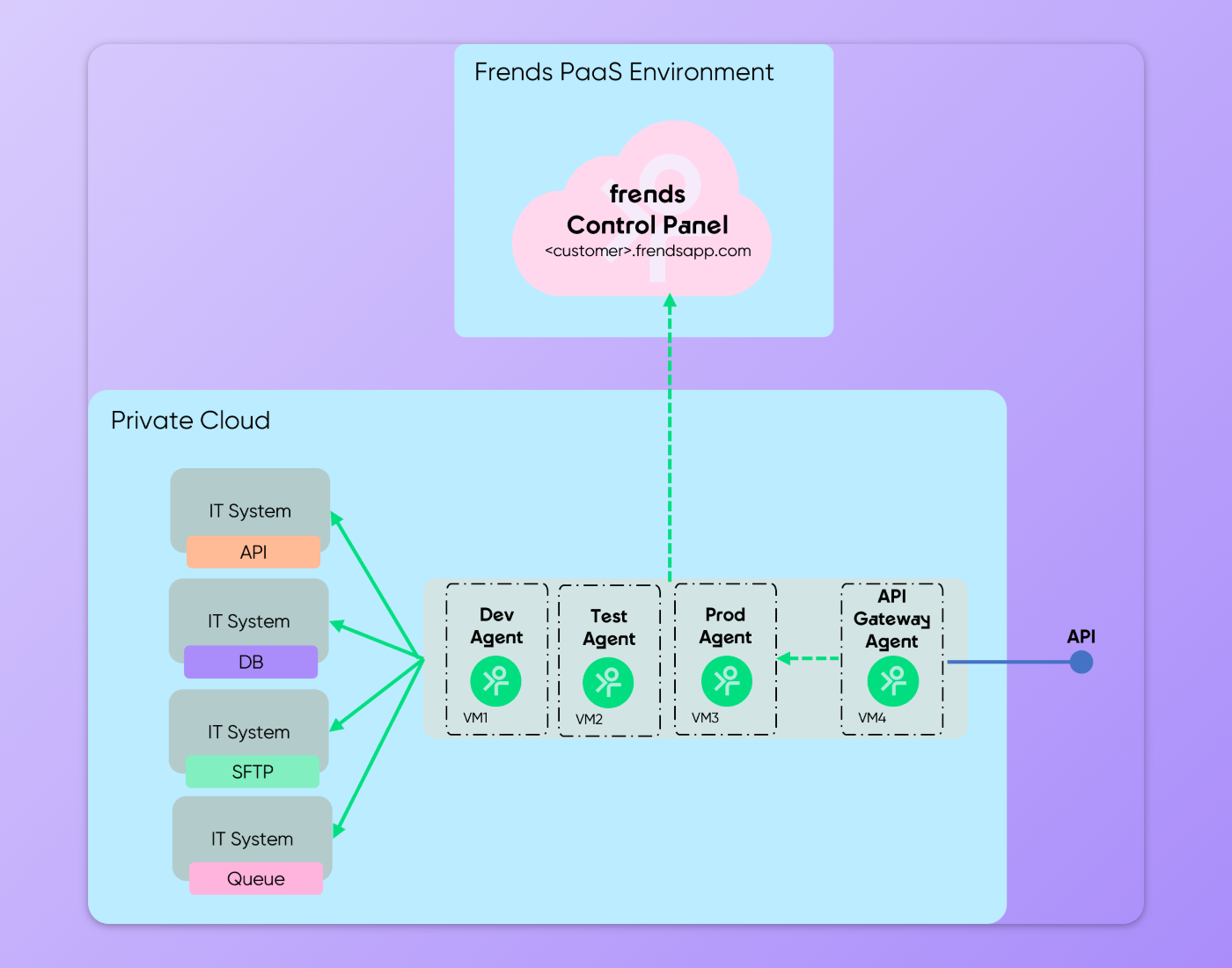
<figure><img src="/files/XwvihYp12V4CgXLBSG3f" alt=""><figcaption><p>Topology diagram of Frends runtime environment.</p></figcaption></figure>

## Tenant

A Frends Tenant is the platform context where users manage integrations, Environments, runtime resources, permissions, and monitoring. In practice, a Tenant is the workspace where the organization designs, deploys, executes, and monitors its integrations.

Within a Tenant, runtime resources are organized into Environments. These Environments contain Agent Groups, and Agent Groups contain Agents. This hierarchy defines where Processes can be deployed and where they can run.

```
Tenant
└── Environment
    └── Agent Group
        └── Agent
```

This structure is important because it separates the logical management of integrations from the actual runtime resources that execute them.

### Frends UI

While Frends UI or the Control Panel is part of your Tenant, it is hosted separately from your Frends runtime components. Communication between Frends UI and the Agents and Agent Groups is done over Service Bus connection, through which Frends UI provides the instructions for Agents to fetch and act on over the service bus.

## Environments

Environments are used to separate different stages or contexts of integration execution. Common examples are Development, Test, UAT, and Production.

This separation helps ensure that development or testing work does not affect production execution. For example, a Process can be developed and verified in a Development Environment before it is deployed to a Production Environment.

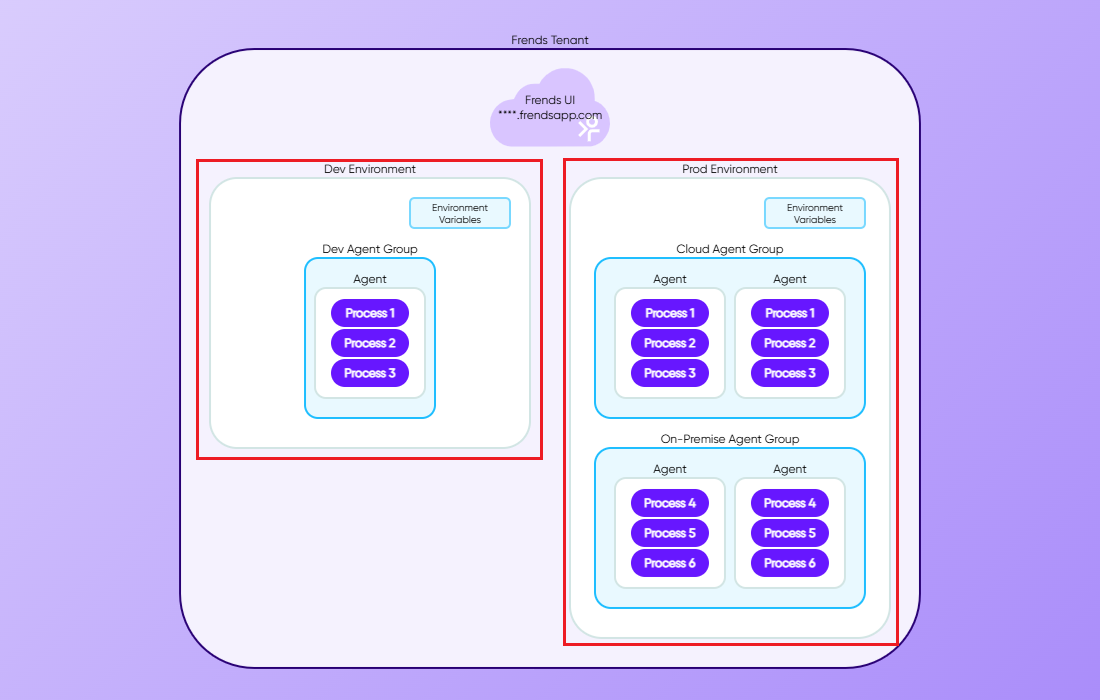
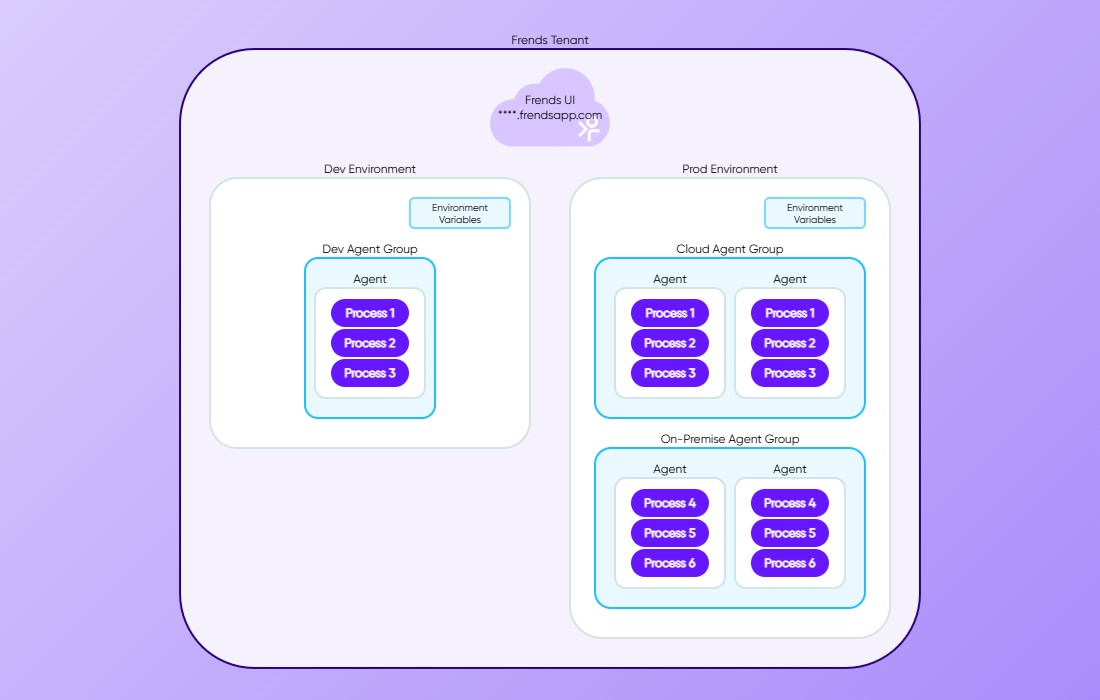
Environments provide the configuration context. Environment-specific Environment Variables can be used so that the same Process definition can behave differently depending on where it is deployed. For example, a Process can use a test API endpoint URL in a Test Environment and a production API endpoint URL in a Production Environment without changing the Process logic itself, if the value is used through Environment Variables.

<figure><img src="/files/jlWBYcliZrhgXKsjbFLc" alt=""><figcaption><p>Environments contain Agent Groups and provide the Environment Variables.</p></figcaption></figure>

### Environments contain Agent Groups

An Environment can contain one or more Agent Groups. The Environment defines the logical runtime context, while the Agent Groups define the actual execution targets inside that context.

For example, a Production Environment could contain separate Agent Groups for cloud execution and on-premises execution. Both belong to the same Production Environment, but they can represent different runtime locations, network access, or execution capacity.

## Agent Groups

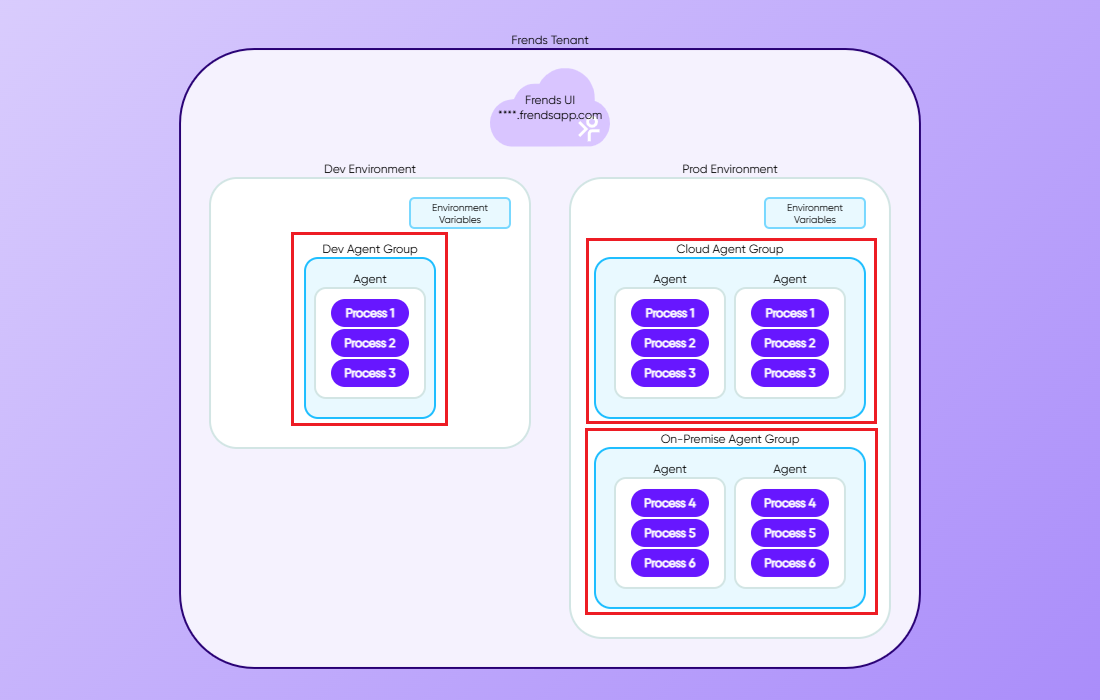
An Agent Group is a group of one or more Agents that run the same deployed Processes with the same settings. Processes are deployed to Agent Groups rather than to individual Agents.

This means that when a Process is deployed, the deployment target is the Agent Group. The Agents inside that Agent Group then provide the actual runtime capacity for executing the Process.

Agent Groups are useful because they allow the runtime to be managed as a group instead of as individual machines or services. If several Agents belong to the same Agent Group, they can work together to provide availability and execution capacity.

<figure><img src="/files/l6MV7D4vBcXzyqNW8Ljm" alt=""><figcaption><p>Agent Groups can contain one or more Agents running the same Processes with same configuration.</p></figcaption></figure>

### Agent Groups represent runtime location and capacity

Agent Groups can represent different runtime locations or technical boundaries. For example, an Agent Group may run in a cloud environment, on an on-premises server, in a private network, or in a containerized runtime.

This is important for integrations that need access to systems that are not publicly available. If a Process needs to connect to an internal database, file share, or business application, it can be deployed to an Agent Group whose Agents have network access to those systems.

Agent Groups can also be used to separate workloads. Different Agent Groups can be created for different types of integrations, business areas, or runtime requirements.

You can [read more about different Frends deployment models here](/docs/frends-6.2.0/hybrid-integration-architecture/deployment-models.md).

## Agents

Agents are the executable software of Frends, performing the Processes as C# executables in the server or environment they have been deployed to. Environments and Agent Groups are mostly logical containers and visual elements tying things together for the user, and Agents are deployed as part of your infrastructure and then connect to your Frends Tenant as part of Agent Groups and Environments.

Agents are defined as part of Agent Groups, which are contained within Environments.
During execution, the Agent runs the Process logic by moving through the configured Process flow. It executes Tasks, evaluates decisions, calls Subprocesses, handles errors according to the Process design, and continues until the Process reaches its end.

Agents also send execution information back to Frends, where it can be viewed as Process Instance data and logs. This makes it possible to monitor executions, inspect results, and troubleshoot errors.

<figure><img src="/files/oArojdJBfsrFa2Juvj1o" alt=""><figcaption><p>Agents are defined as part of Agent Groups, which are contained within Environments.</p></figcaption></figure>

### Types of Agents

Depending on where and how the Agent is installed to, it can be classified either as Frends Cloud Agent or Self Service Agent. Frends Cloud Agents, also commonly called only as Cloud Agents, are automatically deployed Agents that reside in Frends Cloud Environment. Unlike Self Service Agents, which are Agents installed by our customers into their own infrastructure, Cloud Agents are managed and monitored by Frends Platform Operations team.

Self Service Agents, which are also often called On Premise or Ground Agents, are installed and managed by the customers themselves. They can also be installed to cloud environments as well as to your local hardware, depending on your needs. It's also perfectly possible to mix and match different deployments, creating a hybrid deployment of Frends.&#x20;

You can learn more about different deployment models at [Deployment Models](/docs/frends-6.2.0/hybrid-integration-architecture/deployment-models.md) page.

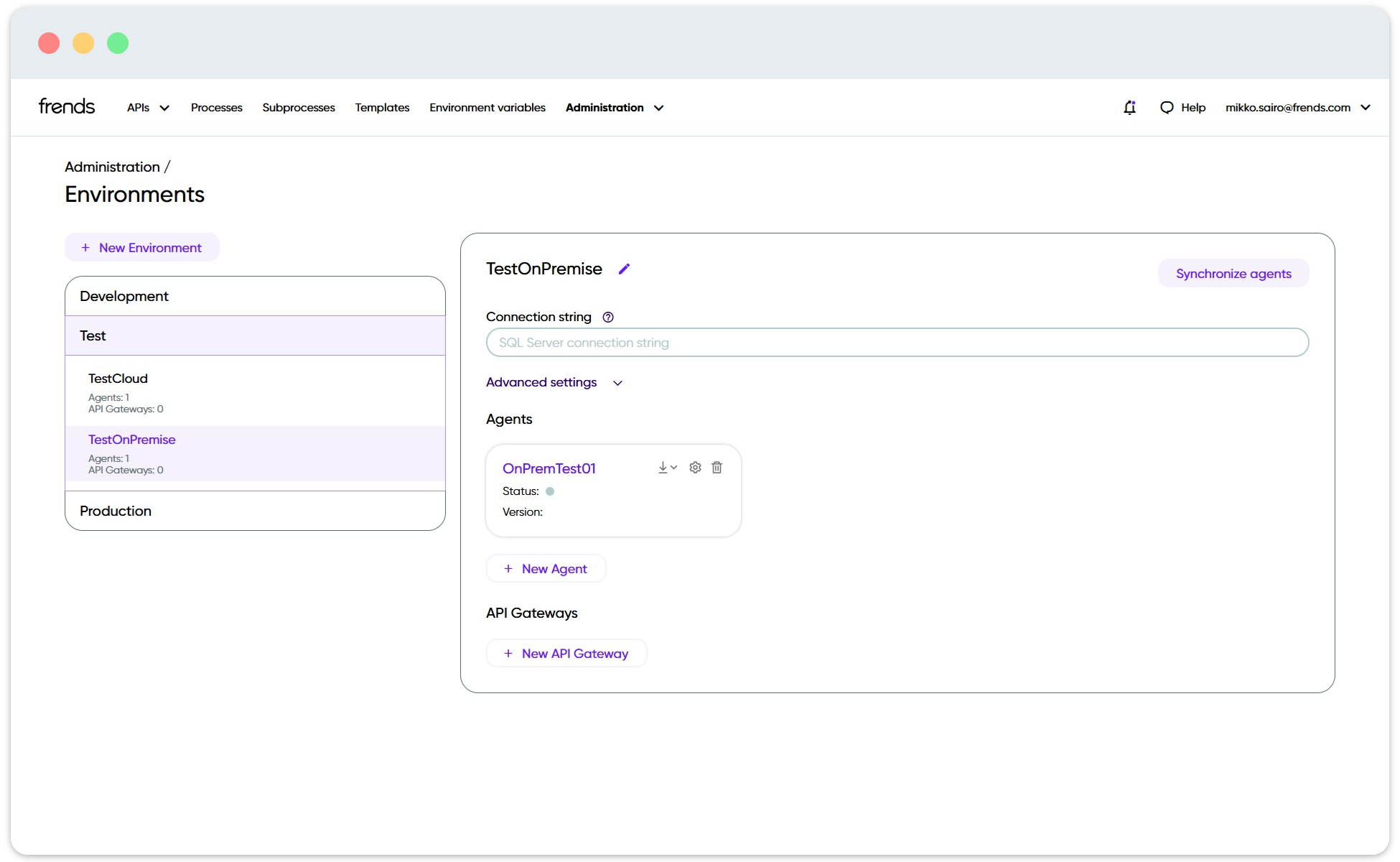
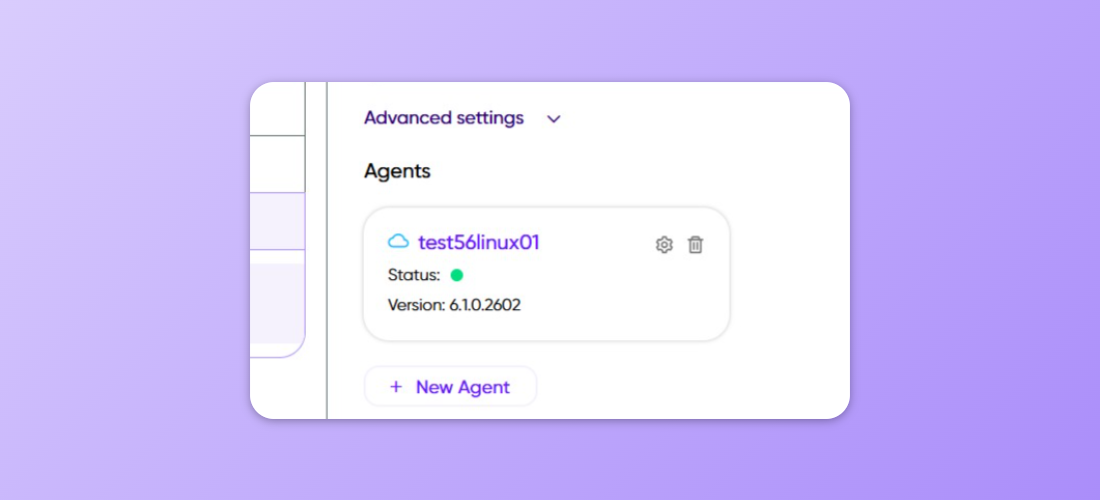
In order to determine the types of Agents installed in your Frends Tenant, you can head over to **Administration > Environments** page, and browse the Agent Groups. A good naming scheme will provide you with information about usage and location of the Agents and Agent Groups, and the UI will also show a small cloud icon next to Frends Cloud Agents. To differentiate the types of Agents further, Cloud Agents will not have any settings available to them in the Control Panel, whereas multiple configuration options exist for Self Service Agents.

<figure><img src="/files/pOkRw4sMpp2eOSPKcSFS" alt=""><figcaption><p>A Frends Cloud Agent will show a cloud icon next to its name in Environments page, along with its version.</p></figcaption></figure>

### Cross-Platform Agents

Another way of differentiating Frends Agents is by the targetable operating systems and supported .NET versions.&#x20;

The latest model of Frends Agent is the Cross-Platform Agent, which can be installed to any operating system that supports .NET platform. Windows and Linux are generally supported at least, alongside containerized environments. Cross-Platform Agent supports .NET Standard 2.0 and .NET 8 as target frameworks for Processes.

The legacy version of Agent supports either .NET Standard 2.0 and .NET Framework 4.7.1, but can only be run on Windows operating systems. As the naming suggests, only legacy support is provided for these Agents, and it is highly recommended to use Cross-Platform Agents moving forward.

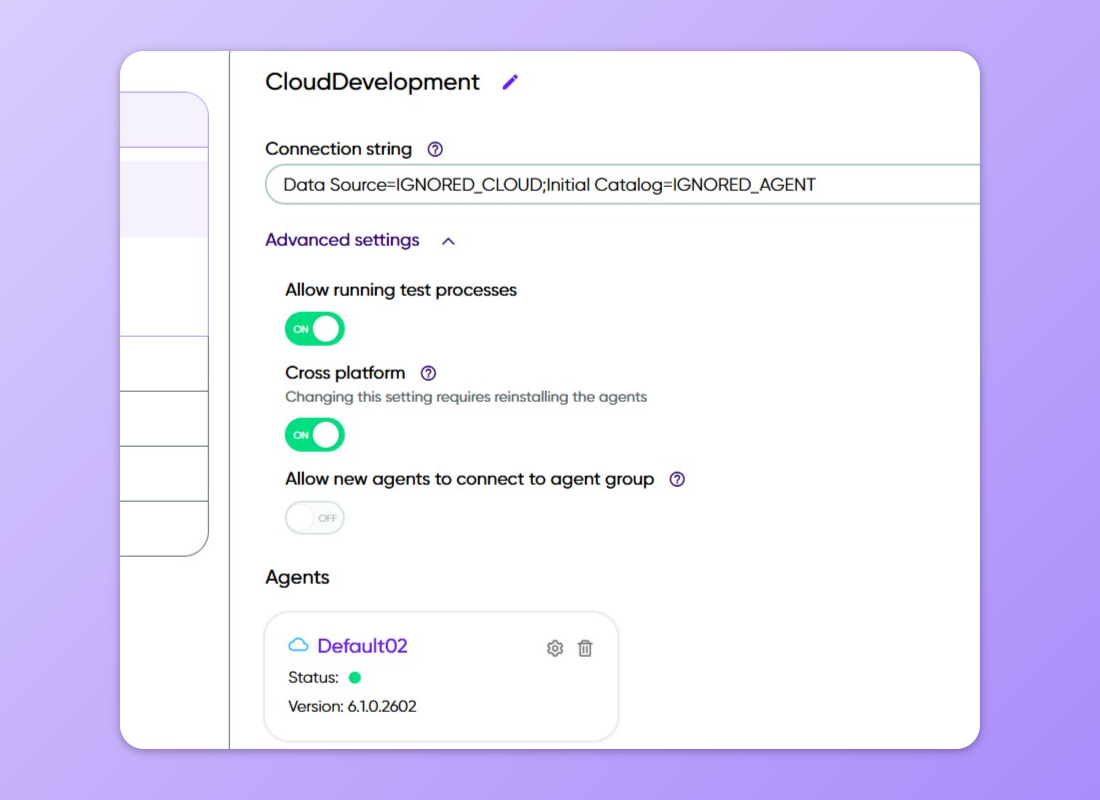
To determine whether you are using Cross-Platform Agents or Legacy Agents, you can see this from the **Advanced Settings** for Agent Group in **Environments** administration page. If **Cross-Platform** option is turned on, all the Agents in that Agent Group have to be Cross-Platform Agents. Otherwise all the Agents should be Legacy if the option is turned off.

<figure><img src="/files/5oEmQfhhySKUcQPI04xW" alt=""><figcaption><p>The Cloud Development Agent Group has been updated to be Cross-Platform.</p></figcaption></figure>

### High Availability

While most deployments contain only one Agent for each Agent Group, it's possible to deploy multiple agents into High Availability configuration, which along with a load balancer can split the executions and load on to multiple Agents. This allows for more performance and better availability of your integration service through horizontal scaling. Containerization can be used with this configuration to dynamically launch new Agents if required.&#x20;

Learn more about High Availability configuration [here](/docs/frends-6.2.0/hybrid-integration-architecture/high-availability.md).

### Gateway Agent

Gateway Agents, or API Gateways are specialized Agents that perform load balancing and proxying for your APIs.

They can be used to securely publish your APIs to public use, while securing your Agents and servers by not allowing direct connections to them from the outside. The Gateway Agent accomplishes this by handling the incoming connections, and only directing valid API requests for handling in the Processes on the actual Agents.

<figure><img src="/files/maBq4yY9xMKKwfPmRuav" alt=""><figcaption><p>Gateway Agent publishes your API endpoints without revealing the actual Agents.</p></figcaption></figure>

## Triggers

A Trigger defines how a Process starts. Every executable Process starts from a Trigger. The Trigger represents the event that should begin a new Process Instance, and Agent is responsible for monitoring the events and matching them to deployed Triggers.

Frends supports different Trigger types for different use cases. A Process can be started manually by a user, on a schedule, from an incoming HTTP or API request, from a file event, from a queue message, or from another supported event source.

The Trigger is part of the Process definition. When the Process is deployed to an Agent Group, the Trigger is deployed with it. The Agent then monitors or handles the Trigger condition. When the Trigger condition occurs, the Agent starts a new Process Instance.


---

# Agent Instructions: Querying This Documentation

If you need additional information that is not directly available in this page, you can query the documentation dynamically by asking a question.

Perform an HTTP GET request on the current page URL with the `ask` query parameter:

```
GET https://docs.frends.com/docs/frends-6.2.0/hybrid-integration-architecture/frends-runtime.md?ask=<question>
```

The question should be specific, self-contained, and written in natural language.
The response will contain a direct answer to the question and relevant excerpts and sources from the documentation.

Use this mechanism when the answer is not explicitly present in the current page, you need clarification or additional context, or you want to retrieve related documentation sections.