> For the complete documentation index, see [llms.txt](https://docs.frends.com/llms.txt). Markdown versions of documentation pages are available by appending `.md` to page URLs; this page is available as [Markdown](https://docs.frends.com/tasks/tasks/ibm-mq.md).
# IBM MQ
IBM MQ is an enterprise-grade message queuing service used to connect applications, systems, and services with guaranteed message delivery.
Frends offers seamless integration with [IBM MQ](https://www.ibm.com/products/mq), enabling you to effortlessly connect and automate data flows between your systems and IBM MQ.
Frends provides tasks for performing all core IBM MQ operations, supporting both standard and secure (TLS/mTLS) connectivity.
By leveraging Frends' task-based approach, you can configure and customize IBM MQ integrations according to your specific requirements. Frends offers a wide range of tasks that facilitate high-performance messaging between distributed systems and modern cloud environments.
## Configuration & mTLS Security
This Task uses **Managed .NET** (`MQC.TRANSPORT_MQSERIES_MANAGED`), which relies on the standard .NET SSL implementation. You can authenticate using either a direct certificate file or the Operating System's certificate store.
### Task Options Reference
* **SslCipherSpec** - Required for TLS. Must match the CipherSpec defined on the MQ Channel. Example: `TLS_RSA_WITH_AES_256_GCM_SHA384`
* **SslPeerName** - Optional. Used to verify the Server's certificate Subject. Example: `CN=MQServer, O=Company`
* **CertSource** - Strategy for loading the certificate: `File` or `Store`. Example: `Store`
* **StoreType** - Defines which OS vault to search: `User` or `System`. Example: `User`
* **SslCertRevocationCheck** - If `true`, checks the Certificate Revocation List (CRL). May fail in air-gapped/offline environments. Example: `false`
* **SslResetCount** - Bytes sent before the secret key is renegotiated (0 = disabled). Example: `0`
### Certificate Loading Strategies
1. Using Certificate Files (`CertSource.File`)
* CertificatePath: Absolute path to your `.p12` or `.pfx` file. (e.g., /app/certs/client.p12).
* CertificatePassword: Password for the private key.
2. Using OS Certificate Store (`CertSource.Store`)
* SslStoreType.User:
Windows: Looks in Certificates - Current User (certmgr.msc).
Linux: Looks in \~/.dotnet/corefx/cryptography/x509stores/my/.
* SslStoreType.System:
Windows: Looks in Certificates - Local Computer (certlm.msc). Requires elevated permissions.
Linux: On Linux there is no separate system-wide store for .NET managed client. Both User and System resolve to the same location: \~/.dotnet/corefx/cryptography/x509stores/my/ Install your certificate there regardless of which StoreType you choose.
Windows - Friendly Name: You must set the "Friendly Name" property of the certificate to: ibmwebspheremq\[login\_username].
Linux Difference: Linux does not support "Friendly Names". The library selects the first valid certificate in the /my/ store matching the connection requirements.
On Linux, if multiple certificates exist in the store, the library picks the first one. Ensure only one client certificate is present in `~/.dotnet/corefx/cryptography/x509stores/my/`
### CipherSpec
* Because this task uses Managed .NET, the SslCipherSpec string is OS-dependent:
Windows Agents: Use Schannel names (e.g., TLS\_RSA\_WITH\_AES\_256\_GCM\_SHA384).
Linux Agents: Use OpenSSL names (e.g., ECDHE\_RSA\_AES\_256\_GCM\_SHA384).
* Queue Manager Best Practice: To support agents on different platforms, configure the MQ Channel with a generic spec:
* `ALTER CHL('DEV.APP.SVRCONN') CHLTYPE(SVRCONN) SSLCIPH(ANY_TLS12_OR_HIGHER) SSLCAUTH(REQUIRED)`
If you control the MQ server configuration, set the channel to `SSLCIPH(ANY_TLS12_OR_HIGHER)` this allows the client to negotiate any TLS 1.2+ cipher and removes the need to match exact cipher names between Windows and Linux clients.
### SslPeerName Validation
Provides an extra layer of security. If the server's certificate Subject does not match the pattern provided in SslPeerName, the connection will be terminated immediately.
```
Success: O=Testing (matches if the server cert belongs to the 'Testing' organization).
Failure: CN=WRONG_NAME (throws an exception if the Common Name is different).
```
### TLS vs Mutual TLS (mTLS)
The configuration required depends on how the MQ Channel is configured on the server side (`SSLCAUTH` parameter):
* `OPTIONAL` mode: TLS. No client certificate required - only `SslCipherSpec` is needed.
* `REQUIRED` mode: mTLS. Client certificate must be installed.
Even with `SSLCAUTH(OPTIONAL)`, the client must trust the server's CA certificate. On Linux: Ensure the server's CA certificate is trusted by the system or the .NET runtime before connecting. On Windows: Import the CA certificate into *Trusted Root Certification Authorities* in the same store as your client certificate:
* `StoreType.User` ? Certificates - Current User (certmgr.msc)
* `StoreType.System` ? Certificates - Local Computer (certlm.msc)
## Use cases
Below you will find typical use cases for IBM MQ integrations and how they are implemented in Frends.
### Create service request
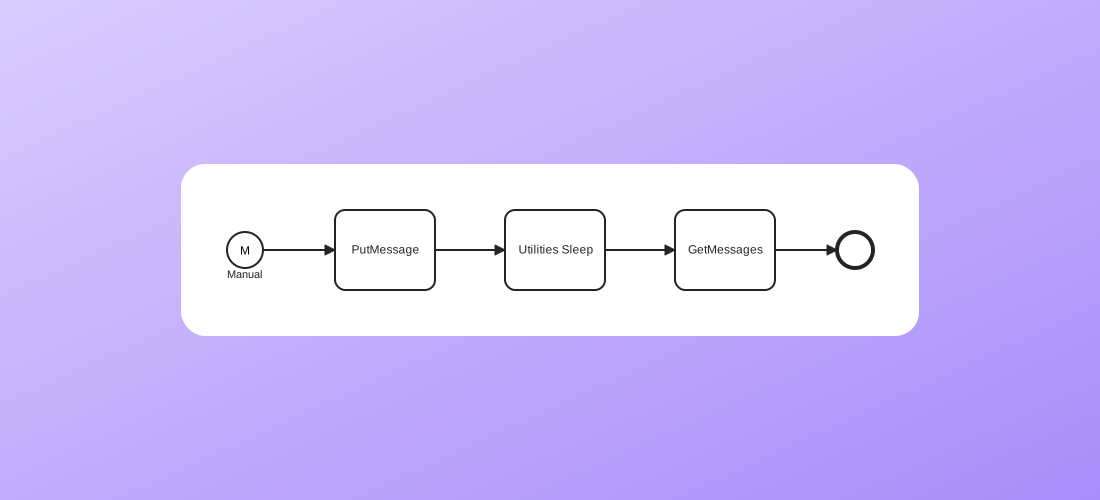
By combining the [`PutMessage`](https://tasks.frends.com/tasks/Frends-IBMMQ-PutMessage/) and [`GetMessages`](https://tasks.frends.com/tasks/Frends-IBMMQ-GetMessages/) tasks, you can implement a reliable Request-Reply pattern. Frends sends a message to the request queue and then polls the reply queue for the processed result.
Create service request
### Monitor and manage queue depth
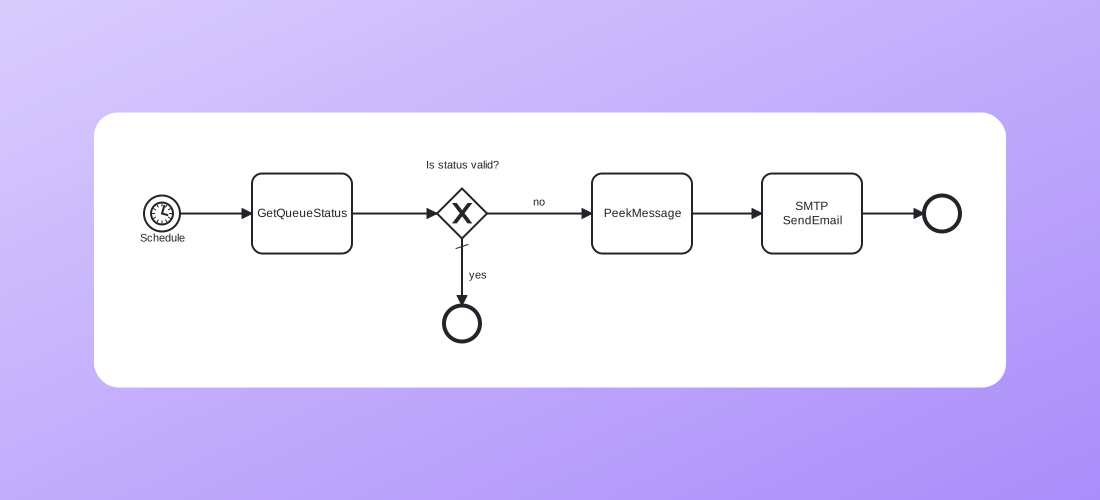
Using the [`GetQueueStatus`](https://tasks.frends.com/tasks/Frends-IBMMQ-GetQueueStatus/) and [`PeekMessage`](https://tasks.frends.com/tasks/Frends-IBMMQ-PeekMessage/) tasks, you can build monitoring workflows that check if a queue is backing up. This allows for proactive integration management, such as alerting or automated scaling, without consuming the actual production data.
Create service request
---
# Agent Instructions
This documentation is published with GitBook. GitBook is the documentation platform designed so that both humans and AI agents can read, navigate, and reason over technical content effectively. Learn more at gitbook.com.
## Querying This Documentation
If you need additional information that is not directly available in this page, you can query the documentation by asking a question.
Perform an HTTP GET request on the following URL with the `ask` and `goal` query parameters:
```
GET https://docs.frends.com/tasks/tasks/ibm-mq.md?ask=&goal=
```
`ask` is the immediate question: it should be specific, self-contained, and written in natural language.
`goal` is what the user is ultimately trying to achieve, the reason they need the answer. Sharing it helps GitBook give you a better, more relevant answer. A goal is most helpful when it describes the outcome the user wants rather than restating the question. For example, with `ask=how do I create an API token`, a goal like `automate deployments from our CI pipeline` lets GitBook tailor the answer to that use case.
The response will contain a direct answer to the question and relevant excerpts and sources from the documentation.
Use this mechanism when the answer is not explicitly present in the current page, you need clarification or additional context, or you want to retrieve related documentation sections.