> For the complete documentation index, see [llms.txt](https://docs.frends.com/llms.txt). Markdown versions of documentation pages are available by appending `.md` to page URLs; this page is available as [Markdown](https://docs.frends.com/tasks/tasks/microsoft-dynamics-365.md).
# Microsoft Dynamics 365
Microsoft Dynamics 365 is a suite of applications for CRM, ERP, and cloud services.
Frends enables seamless integration with the entire Microsoft Dynamics 365 ecosystem—including CRM (Sales, Customer Service), ERP (Business Central), and Finance & Operations—without the need for rigid, one-off connectors. Thanks to the rich and well-documented OData and REST APIs provided by Microsoft Dynamics 365, Frends utilizes its universal HTTP Request capabilities to integrate with **any module**, **any entity**, and **any operation** within the Dynamics stack.
Whether you’re working with Dataverse, managing business processes in F\&O, or interacting with customer data in CRM, Frends acts as a flexible and low-code integration layer that speaks directly to Dynamics APIs. You are not limited by the availability of specific connectors—if the API supports it, Frends can handle it.
This approach allows Frends users to dynamically interact with their Dynamics 365 instances using secure, token-based authentication and customizable endpoints, supporting a wide range of business logic and orchestration patterns.
### Business Use Cases
Organizations use Frends to automate and orchestrate a wide range of business processes across their Microsoft Dynamics 365 landscape. Common scenarios include:
**Customer Data Sync**: Pull and push customer information between CRM and other systems such as eCommerce, invoicing, or marketing platforms.
**Order-to-Cash**: Orchestrate the full cycle of order handling, invoicing, and payment reconciliation across Dynamics F\&O and external systems.
**Real-Time Lead Integration**: Automatically capture leads from webforms, chatbots, or campaign platforms and inject them into Dynamics 365 Sales in real time.
**Master Data Management (MDM)**: Create central hubs of truth by synchronizing master data (products, vendors, employees) across Dynamics modules and external sources.
**Reporting and Analytics**: Aggregate, transform, and export Dynamics 365 data into BI platforms, warehouses, or reporting tools.
**Workflow Orchestration**: Trigger actions in Dynamics based on external events—like file uploads, API calls, or IoT device signals—by integrating with Frends process automation.
Frends gives you full control over the Dynamics APIs—all from within a low-code visual interface.
### Basic Integration Example
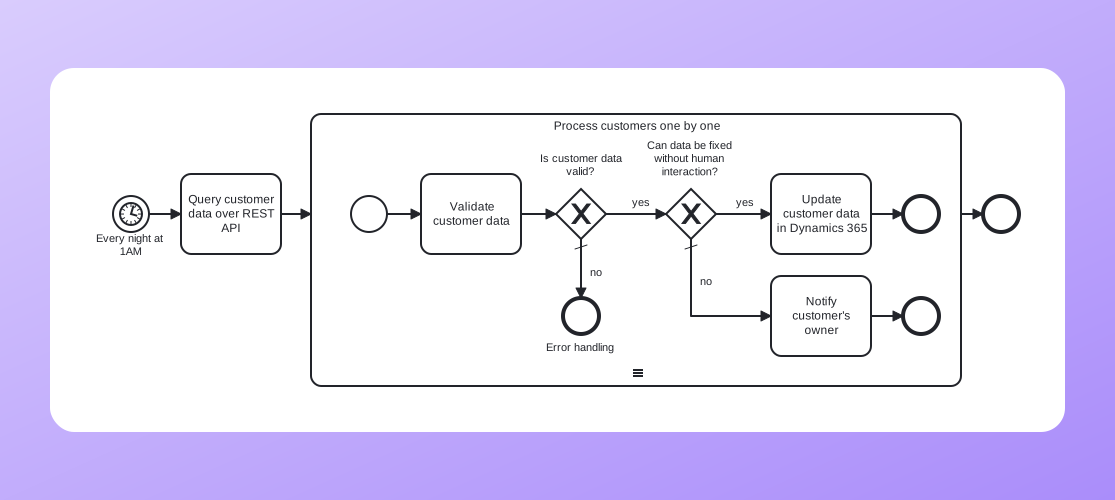
By using the schedule trigger and the [`Request`](/tasks/tasks/microsoft-dynamics-365/request.md) task we can create an integration that validates customer information on a nightly basis and fixes it or reports the problem to the customer's owner.
Sync CRM data
---
# Agent Instructions
This documentation is published with GitBook. GitBook is the documentation platform designed so that both humans and AI agents can read, navigate, and reason over technical content effectively. Learn more at gitbook.com.
## Querying This Documentation
If you need additional information that is not directly available in this page, you can query the documentation dynamically by asking a question.
Perform an HTTP GET request on the current page URL with the `ask` query parameter, and the optional `goal` query parameter:
```
GET https://docs.frends.com/tasks/tasks/microsoft-dynamics-365.md?ask=&goal=
```
`ask` is the immediate question: it should be specific, self-contained, and written in natural language.
`goal` is optional and describes the broader end goal you are ultimately trying to accomplish on behalf of the user. GitBook uses it to tailor the answer towards what is most useful for that goal.
The response will contain a direct answer to the question and relevant excerpts and sources from the documentation.
Use this mechanism when the answer is not explicitly present in the current page, you need clarification or additional context, or you want to retrieve related documentation sections.