# Decision Shapes

Decision shapes can be used in both BPMN and Frends to create conditional paths in the Processes. Of the various shapes available in BPMN, Frends utilises two: Exclusive Decision and Inclusive Decision.

<figure><img src="https://3198802258-files.gitbook.io/~/files/v0/b/gitbook-x-prod.appspot.com/o/spaces%2F1H5SQ92uIfBOYNIeoUAc%2Fuploads%2FzpEMKQ7DuU5HOIdC49i8%2Fimage.png?alt=media&#x26;token=9e1c3f0c-d656-4d0e-963b-7434573912dc" alt="Picture showing use cases for different Decision Shape types."><figcaption><p>Decision shapes can be used to easily branch your Processes.</p></figcaption></figure>

Exclusive Decision is the standard if-else-statement from general programming. A single condition is given, and it has to be either true or false, to choose a path from the two available.&#x20;

For Inclusive Decision, each path is given a condition. Execution can follow only one path in Process, or split into multiple paths if multiple conditions are true. It's also possible that none of the conditions are fulfilled, making the Process skip the paths altogether, using an implicit "no action" path to the point where the paths converge again.

## Exclusive Decision

Exclusive Decision shape is used to make an alternative path in Frends Process, using a single condition. Similar to if-else-statement in common programming languages, either path will be entered and executed depending if the statement results in true or false.

In Frends Processes and BPMN, the shape consists of the gateway shape, as well as two connected sequence flows. Either one of the two arrows will be marked as **default** **branch**, which denotes the path to take when the expression of the decision results in false, while the non-default branch will be entered, if the condition is true. Frends automatically augments these branches with Yes and No display names, corresponding to true and fales evaluation, giving easy visual cue to which path will be taken.

<figure><img src="https://3198802258-files.gitbook.io/~/files/v0/b/gitbook-x-prod.appspot.com/o/spaces%2F1H5SQ92uIfBOYNIeoUAc%2Fuploads%2FrnkGCEhR0o2nam0tWYJw%2Fimage.png?alt=media&#x26;token=5bb99d11-9432-4160-9d01-ab14efc1a74f" alt=""><figcaption><p>Exclusive Decision allows execution of either of the two branches connected to it.</p></figcaption></figure>

## Inclusive Decision

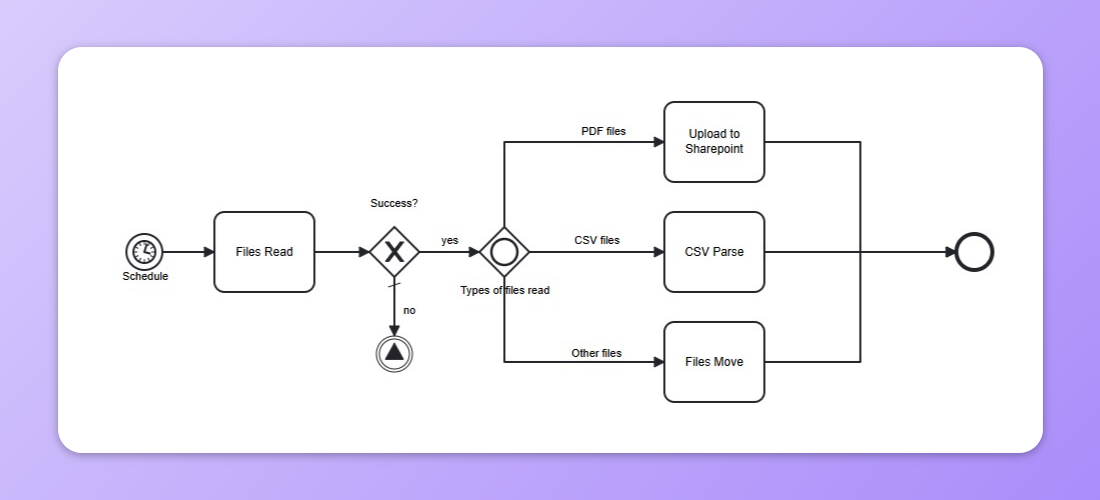
Inclusive Decision shape can be used to create complex set of rules and multiple branches in a Process, where each branch will have its own condition, which if evaluated to true, will be executed. Unlike Exclusive Decision, Inclusive Decision allows executing more than one path, as long as the conditions evaluate to true.

A branch in Inclusive Decision can be marked as **default branch**, which will be always executed. The default branch is not mandatory in Inclusive Decision, and an implicit default branch of no action will be used, if none of the branches are executed.

<figure><img src="https://3198802258-files.gitbook.io/~/files/v0/b/gitbook-x-prod.appspot.com/o/spaces%2F1H5SQ92uIfBOYNIeoUAc%2Fuploads%2FJDl4mV4d90q3UsxIeUSu%2Fimage.png?alt=media&#x26;token=84cbd397-9bc6-4202-991d-51979a6f73e8" alt="Example of inclusive decision in a Frends Process."><figcaption><p>Inclusive Decision can be used to simplify multicase selection.</p></figcaption></figure>


---

# Agent Instructions: Querying This Documentation

If you need additional information that is not directly available in this page, you can query the documentation dynamically by asking a question.

Perform an HTTP GET request on the current page URL with the `ask` query parameter:

```
GET https://docs.frends.com/reference/shapes/decision-shapes.md?ask=<question>
```

The question should be specific, self-contained, and written in natural language.
The response will contain a direct answer to the question and relevant excerpts and sources from the documentation.

Use this mechanism when the answer is not explicitly present in the current page, you need clarification or additional context, or you want to retrieve related documentation sections.
