# Error handling & Monitoring

Frends implements multiple ways to handle errors from Processes. While the best option is to have no errors, working with multiple external systems means not everything is controlled by Frends.&#x20;

Frends includes multiple layers of error handling features available to use within Processes, around Processes and on Environment wide level.&#x20;

## Process error handling

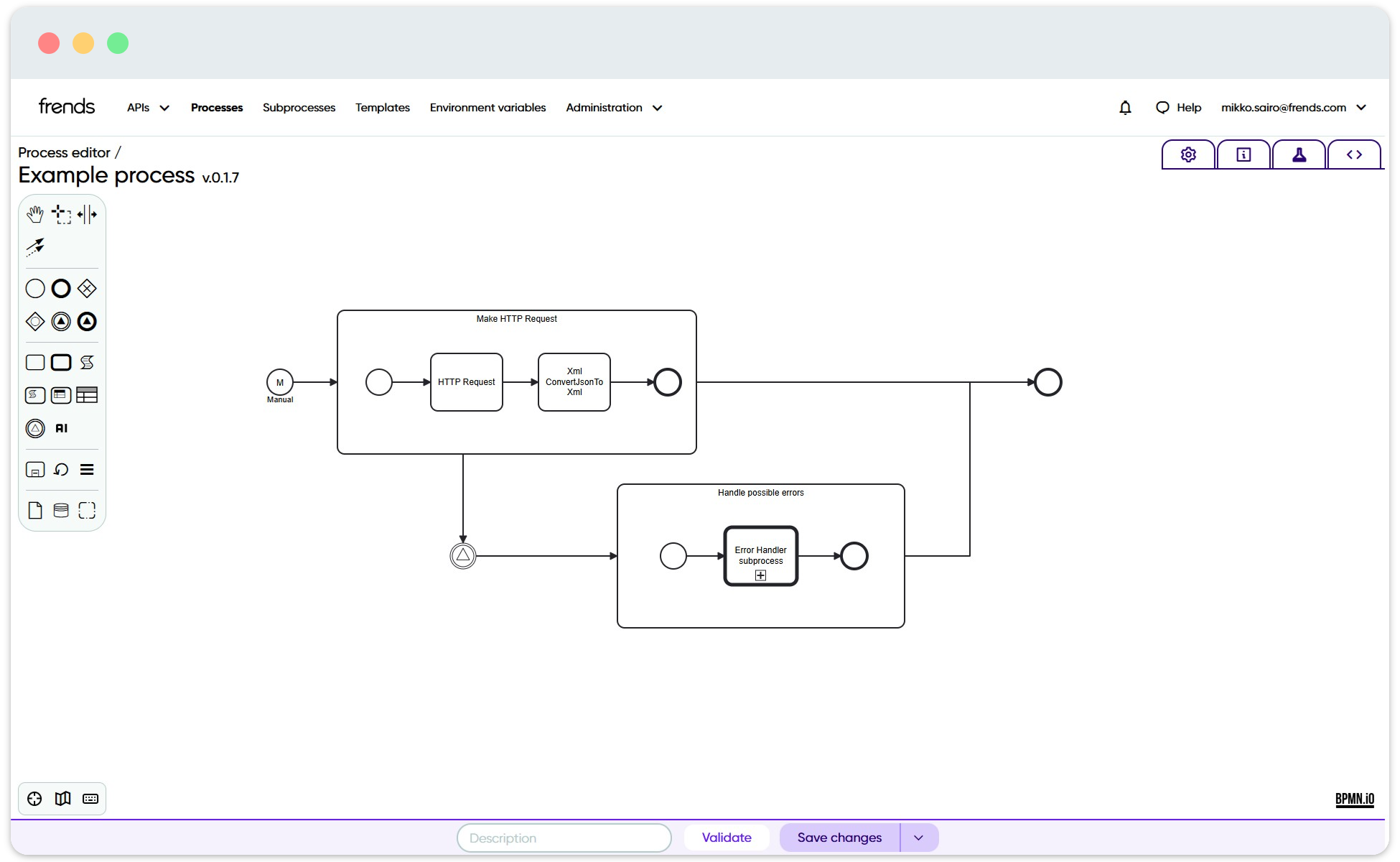
Each Process in Frends can implement their own error handling procedure. At its simplest, a Catch shape can be used to handle any errors within the Process, without disrupting the Process execution more than necessary. This can be useful, if execution should continue for the remainder of data being handled, or if the error is small and can be fixed during the execution.&#x20;

<figure><img src="/files/DjbsD6AUtK9Mw0CCfCl1" alt="Image shows a Catch shape being used within Frends Process."><figcaption><p>Common structure in Frends Process to handle an error within the Process.</p></figcaption></figure>

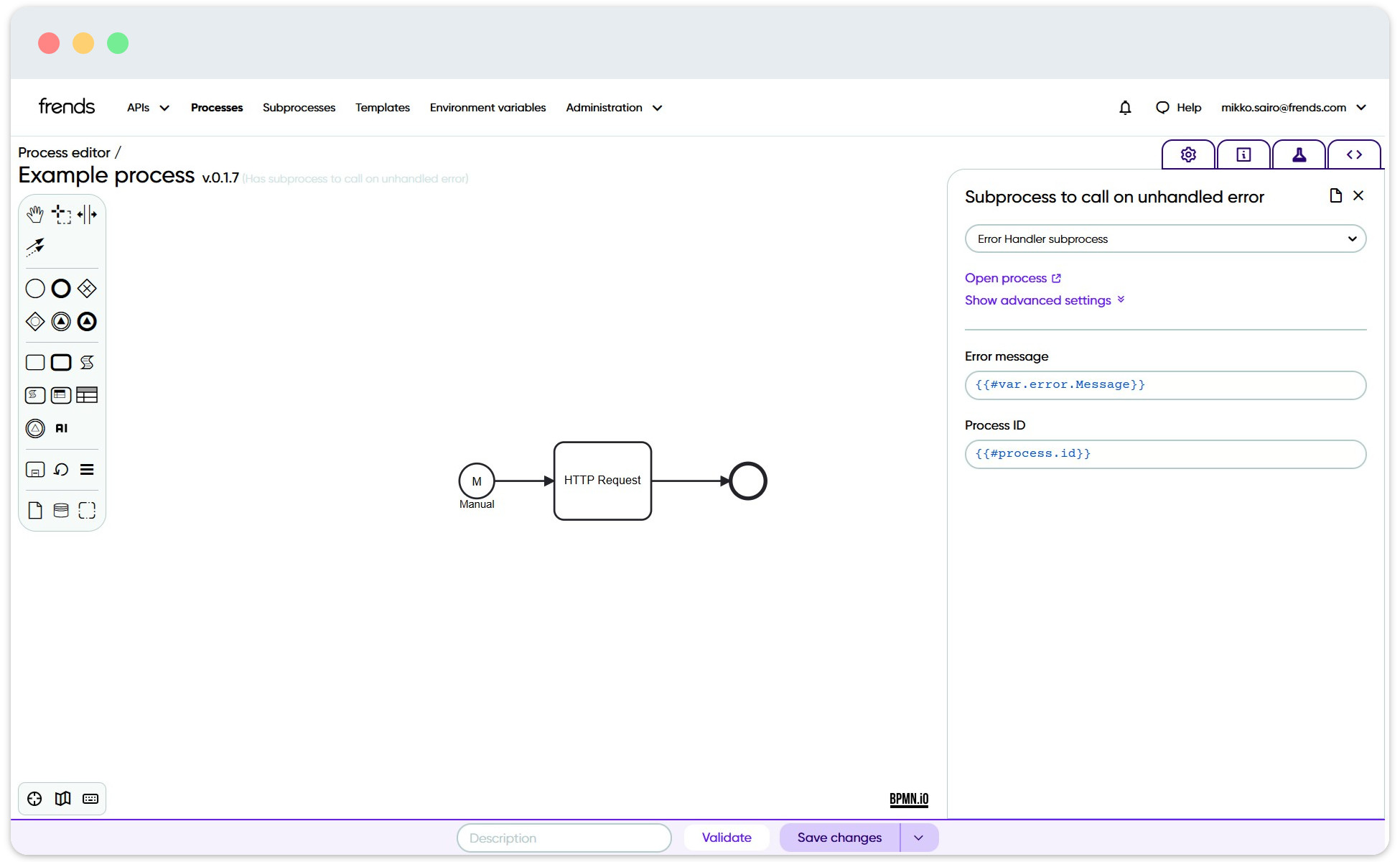
Another option for error handling is using a common Subprocess to handle any errors that occurred during Process execution. This way if there are errors within Process that were not handled, a Subprocess will be called and it will execute its logic to handle the error. Common scheme to handle errors is to send an alert by email, optionally having a treshold value before or after sending an email.&#x20;

Because the error handling is implemented as a Subprocess in Frends, the logic for it is just as flexible and easy to create as the integrations themselves. It should be noted however, that the Process execution will have stopped by the time the error handling Subprocess is executed, so it is only usable for alerting and possibly for cleanup of the Process.

<figure><img src="/files/5k9SICVULTyCnMUs6FkM" alt="Image showing parameters for Subprocess to call on unhandled error."><figcaption><p>Parameters for Subprocess to call on unhandled error are specified by the Subprocess.</p></figcaption></figure>

## Monitoring Rules

In case even more complex monitoring and email alerts are required, Frends includes Monitoring Rules. These rules can be set to trigger a Process or send email alert if the conditions are fulfilled in the environment.&#x20;

<figure><img src="/files/gVSHPeole2QiaIIXscQA" alt=""><figcaption><p>Monitoring rule view showing instance counts for the specified rule.</p></figcaption></figure>

Common use cases for Monitoring Rules are to see if errors occur multiple times over a time period, or if integrations are not executed at all within a specified time, or less times than what is expected. They can also be used to monitor if something takes longer than expected. While these would be difficult to check and monitor within Process Instances, at Environment level it becomes easier and more intuitive to set up rules to monitor your integrations.

At the basis of Monitoring Rules are the promoted values from Processes. Monitoring Rules specifically target and monitor the promoted values from all Processes in the Environment, so it's possible to target either one or more Processes, or only specific errors from multiple different Processes.

And when the Monitoring Rule does notice that an alert should be made, it can be set to be either a simple email alert to specified recipients, or more advanced set of alerting and error handling tasks by triggering a Process to run, when the rules are fulfilled.


---

# Agent Instructions: Querying This Documentation

If you need additional information that is not directly available in this page, you can query the documentation dynamically by asking a question.

Perform an HTTP GET request on the current page URL with the `ask` query parameter:

```
GET https://docs.frends.com/management-and-operations/dashboard-and-monitoring/error-handling-and-monitoring.md?ask=<question>
```

The question should be specific, self-contained, and written in natural language.
The response will contain a direct answer to the question and relevant excerpts and sources from the documentation.

Use this mechanism when the answer is not explicitly present in the current page, you need clarification or additional context, or you want to retrieve related documentation sections.